
[DEPRECATED] How to setup email receiving in Gmail
WARNING: Google is in the process of removing the ability to check email via imap and pop3 from other accounts. You will not be able to use this guide any more.
Assuming you have followed the steps in How to setup email sending in Gmail already, make your way back to the "Accounts (Steps 1 through 3).
Step 1 - Click on Add a mail account
In the Settings > Accounts and Import page look for "Check mail from other accounts".

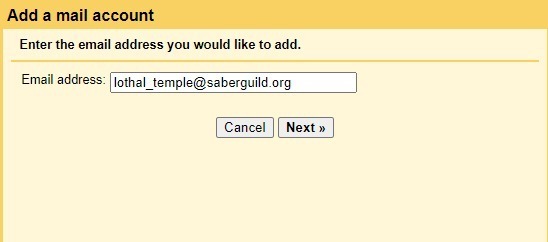
Step 2 - Fill your email address
In the popup, set the email address and click Next.
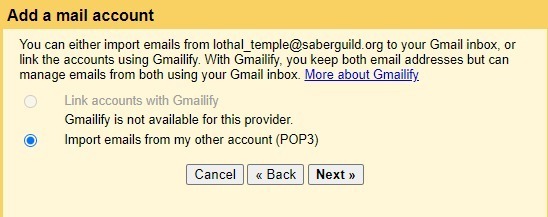
Step 3 - Choose Import emails from my other account
Choose this option and click "Next"
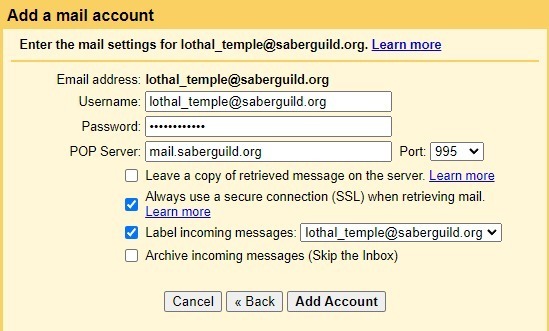
Step 4 - Fill in the email server settings
Username: <full email address>
Password: <the account password>
POP Server: mail.saberguild.org
Port: 995
[ ] Leave a copy of retrieved message on the server : You can leave this unchecked or not, it's up to you
[ ] Always use a secure connection (SSL) when retrieving mail: Always good to be secure
[ ] Label incoming messages : This is a helpful tool for sorting what email came through the new account
Fill out all the details here, then click "Add Account"
Step 5 - Great Success
Refresh the settings page after a minute or two and you should see something like this.
